 GitBucket
 One
One
工场网 V2.0
架构
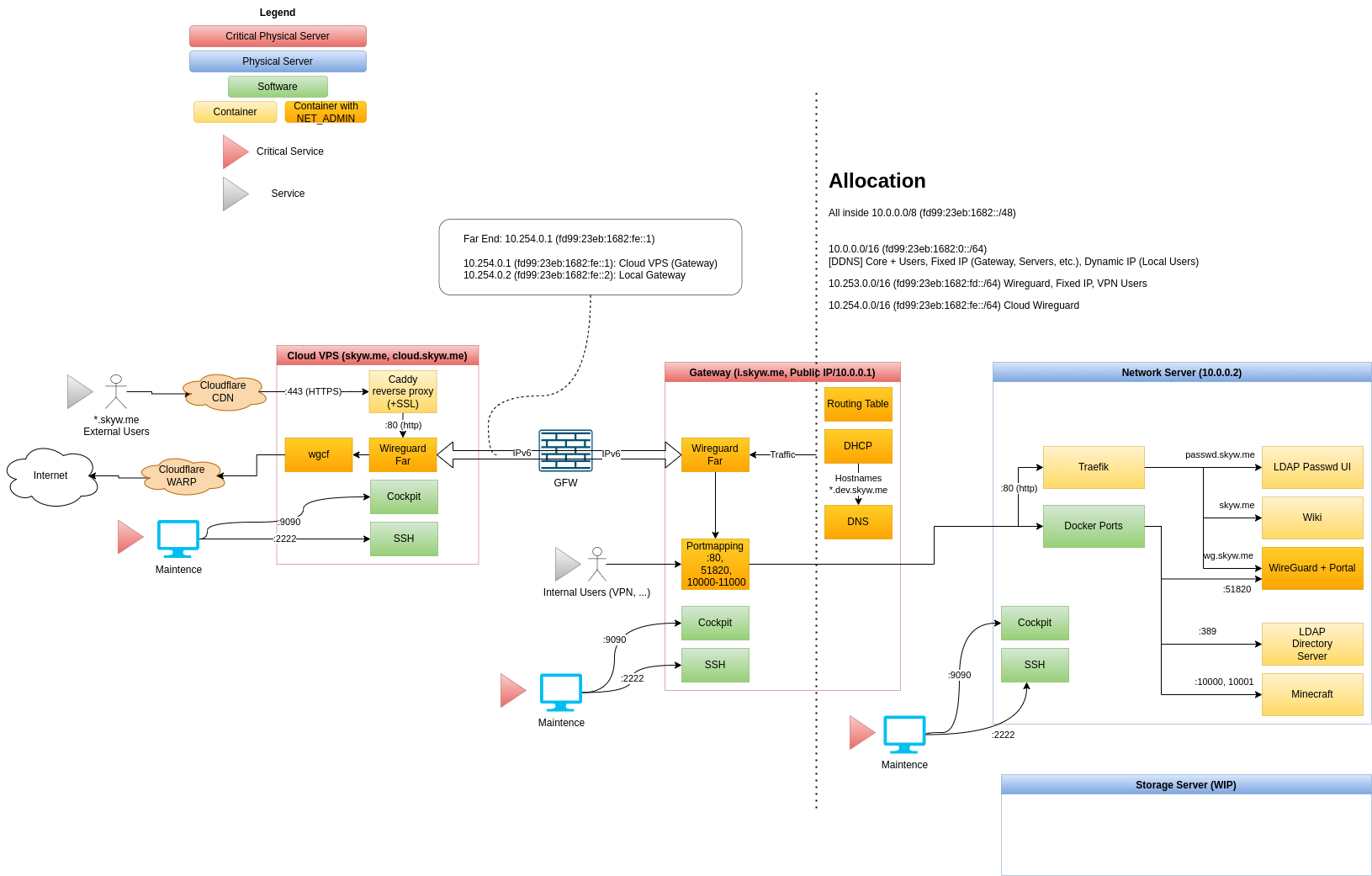
服务列表
域名
Cloudflare (DNS, CDN)
Cloud VPS
Gateway Server
Network Server
服务器 Setup
建议安装 Debian latest (>= 10)
Enter root (if not)
(All repo files is placed under /root)
sudo -i
Verify SSH key (optional)
ssh-keygen -lf /etc/ssh/ssh_host_ecdsa_key
Generate GPG key without passphrase
apt install -y gpg
gpg --batch --passphrase '' --quick-gen-key <SERVER_EMAIL_ADDRESS>
Add GPG key to ssh
gpg -K --with-keygrip
echo <GPG_PUBLIC_KEY_SHOWN_ABOVE> >> ~/.gnupg/sshcontrol
Enable GPG ssh support
echo "enable-ssh-support" >> ~/.gnupg/gpg-agent.conf
echo "export SSH_AUTH_SOCK=$(gpgconf --list-dirs agent-ssh-socket)" >> ~/.bashrc
echo "gpgconf --launch gpg-agent" >> ~/.bashrc
. ~/.bashrc
(On development PC) Tell this key the secrets on repo
To view GPG key:
gpg --armor --export <SERVER_EMAIL_ADDRESS>
(On github) Add this key to server code repo's deploy SSH keys
To view SSH key:
ssh-add -L
Setup networking
Put /etc/network/interfaces with server-specific interface configuration
nano /etc/network/interfaces
Clone server repo
cd ~
apt install -y git
git clone --recursive [email protected]:skyw-me/skynet-server-<SERVER_NAME>.git
Server automatic setup
WARNING: this script will reboot when finished
./public/setup-debian.sh
Start services
Services will automatic startup, by using docker restart option
cd skynet-server-<SERVER_NAME>
./public/deploy.sh
网络设置
Cloud
# This file describes the network interfaces available on your system
# and how to activate them. For more information, see interfaces(5).

source /etc/network/interfaces.d/*

# The loopback network interface
auto lo
iface lo inet loopback

# The primary network interface
auto eth0
iface eth0 inet manual

auto eth1
iface eth1 inet manual

# Web connection
auto br-web
iface br-web inet static
  bridge_ports eth1
  bridge_stp off

  address 104.149.164.34
  netmask 255.255.255.252
  gateway 104.149.164.33

  dns-nameservers 1.1.1.1

iface br-web inet6 static
  address 2604:6600:0:48::2/64
  gateway 2604:6600:0:48::1
Gateway
DUID
For some ISP DHCPv6 to work, we must set dhcp client duid to DUID-LLT ending with MAC address
edit the beginning line of
/var/lib/dhcp/dhclient.br-wan.leases
/var/lib/dhcp/dhclient6.br-wan.leases
set to
default-duid "\000\001\000\001)\251\334\344\254\313Q\357\355\314";
Network interfaces
Hint 1: ifup processes interfaces from top to down, and stop if one interface fails.
So please place static interfaces on top (100% success), others that may fail (DHCP) on bottom
Hint 2: Use accept_ra 2 to accept RA and add ipv6 default routes
# This file describes the network interfaces available on your system
# and how to activate them. For more information, see interfaces(5).

source /etc/network/interfaces.d/*

# The loopback network interface
auto lo
iface lo inet loopback

# Primary: eno1 VLAN Trunk
auto eno1
iface eno1 inet manual

# VLAN100: LAN
auto br-lan
iface br-lan inet static
    bridge_ports eno1.100
    bridge_stp off

    bridge_hw 00:81:33:a9:d0:02

    address 10.0.0.1
    netmask 255.255.0.0

iface br-lan inet6 static
    address fd99:23eb:1682::1/64

# VLAN4: Compatibility Layer for /24 Devices
auto br-compatdev
iface br-compatdev inet static
    bridge_ports eno1.4
    bridge_stp off

    bridge_hw 8f:5e:21:bc:9c:0b

    address 10.3.0.1
    netmask 255.255.255.0

    # DNAT & allow established connections
    post-up iptables -t nat -A POSTROUTING -o $IFACE -j MASQUERADE
    post-up iptables -A FORWARD -i $IFACE -m conntrack --ctstate ESTABLISHED,RELATED -j ACCEPT
    # remove rules
    post-down iptables -t nat -D POSTROUTING -o $IFACE -j MASQUERADE
    post-down iptables -D FORWARD -i $IFACE -m conntrack --ctstate ESTABLISHED,RELATED -j ACCEPT

# VLAN3: WAN
auto br-wan
iface br-wan inet static
    bridge_ports eno1.3
    bridge_stp off

    bridge_hw ac:cb:51:ef:ed:cc
    address 166.111.17.67
    netmask 255.255.255.192
    gateway 166.111.17.65

    dns-nameservers 1.1.1.1

# WAN ipv6 dhcp (maybe) unstable...
iface br-wan inet6 dhcp
    accept_ra 2

    dns-nameservers 2606:4700:4700::1111

# Previous ISATAP v6

#auto br-wan-ipv6
#iface br-wan-ipv6 inet6 static
#    address 2402:f000:1:1501:200:5efe:166.111.17.67
#    netmask 64
#    gateway fe80::200:5efe:166.111.21.1

#    pre-up ip tunnel add $IFACE mode isatap remote any local 166.111.17.67
#    pre-up ip tunnel prl dev $IFACE prl-default 166.111.21.1
Webserver
DUID
For port forwarding rule to work, set MAC address of primary interface (for DHCPv4) and DHCP DUID (for DHCPv6), to retrieve fixed address from gateway.
edit the beginning line of
/var/lib/dhcp/dhclient.<INTERFACE_NAME>.leases
/var/lib/dhcp/dhclient6.<INTERFACE_NAME>.leases
set to
default-duid "\000\001\000\001)\361\037w\200\030D\345\020\230";
set MAC address to 00:11:22:33:44:55 (see below)
Network interfaces
# This file describes the network interfaces available on your system
# and how to activate them. For more information, see interfaces(5).

source /etc/network/interfaces.d/*

# The loopback network interface
auto lo
iface lo inet loopback

# Primary interface
auto eno1
iface eno1 inet manual

# Main network bridge (v4, v6)
auto br-lan
iface br-lan inet dhcp
    bridge_ports eno1
    bridge_stp off

    hwaddress 00:11:22:33:44:55

iface br-lan inet6 dhcp
    accept_ra 2
域名
[TODO]